


Hiring a virtual assistant should make your business easier to run.
More time back. Less admin. Better output.
But for a lot of businesses, that’s not what happens.
Instead, they end up:
- Repeating instructions
- Fixing mistakes
- Chasing updates
- Or worse, starting the whole process again
The problem is rarely the virtual assistant.
It’s the implementation.
If the setup is unclear, unsupported, or built on the wrong structure, even a good VA will struggle. If it’s done properly, a VA becomes one of the most effective ways to scale without increasing overhead.
This guide breaks down how to implement a virtual assistant properly from day one.
Key Takeaways
- Virtual assistant implementation is the process of integrating a VA into your business properly, including the tasks you delegate, the systems they use, how they are onboarded, and how their work is managed.
- A successful implementation starts before hiring. You need to identify repeatable, process-driven tasks, prepare clear instructions, and make sure the role is built around work that can be handed over consistently.
- The right systems matter. Task management, communication, and visibility into work are what stop a VA setup from becoming disorganised and hard to manage.
- Good onboarding is a core part of implementation. Starting with a small number of tasks, reviewing work early, and setting clear expectations helps the VA become productive faster.
- The long-term success of a VA does not just depend on the person. It depends on the structure, support, and processes behind the role, which is why implementation is what determines whether outsourcing saves time or creates more work.
What Virtual Assistant Implementation Actually Means
Virtual assistant implementation is not just hiring someone.
It’s how you integrate that person into your business so they can consistently take work off your plate.
That includes:
- The tasks you delegate
- The systems they work in
- How they are onboarded
- How their work is managed
- The support structure behind them
Hiring is one step. Implementation is everything that makes the role work long-term.
How to Implement Virtual Assistants Properly to Your Business
Step 1: Identify the Right Work to Delegate
Before you hire, you need clarity on what you are actually handing over.
The best tasks for a virtual assistant are:
- Repetitive
- Process-driven
- Time-consuming
- Low to mid-level decision making
Common examples include:
- Inbox and calendar management
- CRM updates and data entry
- Customer follow-up
- Reporting and admin support
- Social media scheduling
- Document preparation
A simple test helps here.
If the task needs to be done regularly and follows a similar process each time, it’s likely a good fit for a VA.
If it changes every time or depends heavily on your judgement, it’s not ready to delegate yet.
Step 2: Prepare Your Processes Before Hiring
A VA should not be figuring things out from scratch.
They should be following a process.
That doesn’t mean building complex systems. It means making the task clear enough that someone else can complete it without relying on you every step of the way.
At a minimum, that includes:
- A simple checklist
- A short screen recording if needed
- Examples of what “done correctly” looks like
For example, instead of saying “upload this blog”, you define:
- Where it gets uploaded
- How it should be formatted
- What needs to be checked before publishing
- What the final page should look like
Clarity here removes most back-and-forth later.
Step 3: Choose the Right Implementation Model
This is where a lot of outcomes are decided.
You’re not just choosing a person. You’re choosing how that person will be supported.
Freelancers
Freelancers can work well if:
- You already have strong systems
- You’re comfortable managing everything yourself
- The work is clearly defined
But you are responsible for:
- Onboarding
- Training
- Management
- Replacing them if things don’t work out
Virtual Assistant Agencies
An agency such as Outsource Teams provides more structure around the role.
That typically includes:
- Pre-vetted candidates
- Onboarding support
- Built-in systems
- Ongoing management
The key difference is not the individual. It’s the environment they operate in.
A well-supported VA will usually outperform a better individual working without structure.
Step 4: Set Up Systems Before Your VA Starts
A VA should never start with “what should I work on?”
That’s a setup issue.
You need:
- A clear task list or task board
- One central communication channel
- Visibility into what is being worked on
This could be simple, but it needs to exist.
Without systems:
- Tasks get missed
- Work becomes inconsistent
- You lose visibility
With systems:
- Work is structured
- Progress is clear
- Expectations are aligned
This is one of the biggest differences between a setup that works and one that doesn’t.
Step 5: Onboard Properly (The First Two Weeks Matter Most)
The first two weeks set the standard.
Most issues happen here because expectations are unclear.
Instead of handing everything over at once:
- Start with a small number of tasks
- Review work early and often
- Give clear, direct feedback
- Adjust as needed
This is not about immediate efficiency. It’s about building consistency.
A structured onboarding process reduces errors and speeds up performance long-term.
Step 6: Create Visibility and Accountability
If you can’t see what’s being done, the setup won’t last.
You need:
- Clear ownership of tasks
- Defined deadlines
- A way to track progress
That might include:
- Task boards showing status
- Timesheets or tracked hours
- Centralised communication
This removes guesswork.
It also means you are not chasing updates or wondering what’s been completed.
This is one of the biggest advantages of implementing a VA through Outsource Teams.
Our platform gives you full visibility over the role from day one, so you are not relying on scattered messages, manual follow-up, or guesswork.
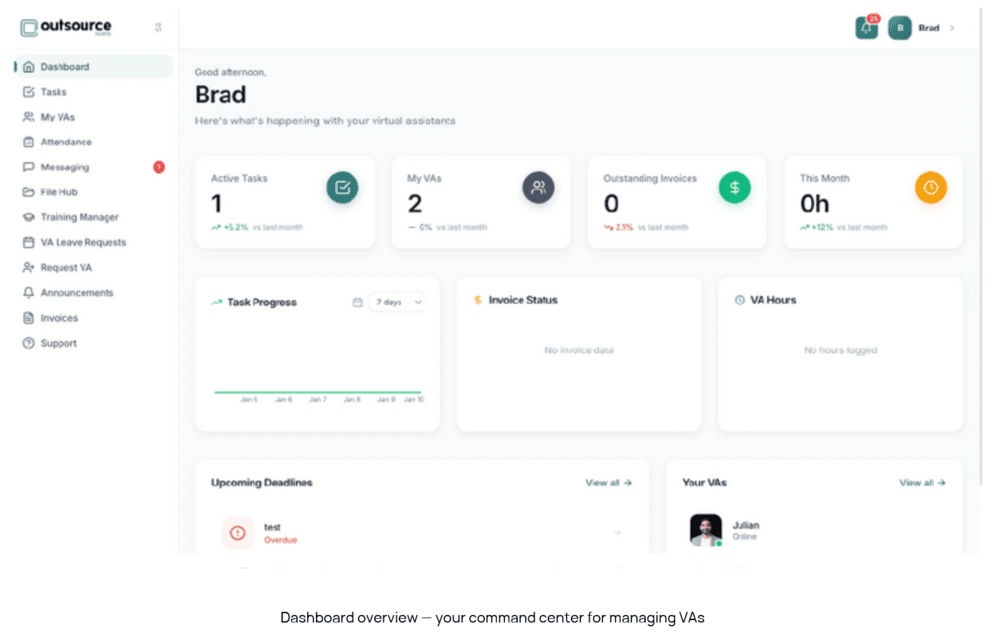
You can manage everything through one central client dashboard, with built-in Kanban task boards to track progress, digital timesheets with approval workflows, integrated messaging, a custom training platform, and leave management tools that keep availability clear.
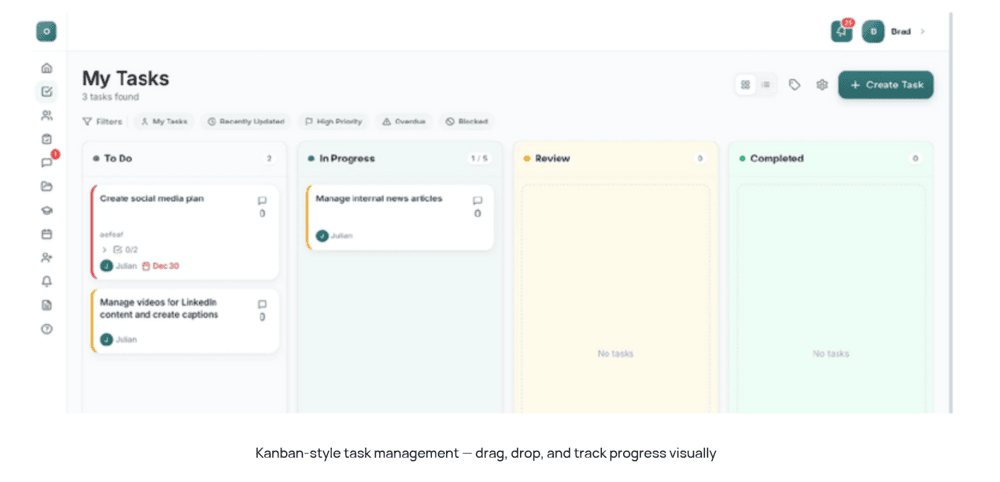
That structure makes accountability much easier to maintain. You can see what tasks are active, what has been completed, how hours are being used, and where support is needed, all in one place.
Instead of chasing updates, you have a clear system for managing work, communication, onboarding, and oversight, which makes the entire implementation far easier to control and scale.
Step 7: Plan for Continuity and Scale
This is often overlooked, but it’s critical.
Things change.
A VA may not be the right fit. They may leave. Your needs may grow.
If your setup depends entirely on one person with no structure behind them, you’re exposed.
As highlighted in our guide, many businesses lose weeks of time when they have to restart the process.
A strong implementation includes:
- Documented processes
- A clear replacement pathway
- The ability to scale up or down
This protects your business from disruption.
What a Successful Virtual Assistant Implementation Looks Like
When it’s done properly, the difference is clear.
- Tasks get completed without constant follow-up
- You have visibility into what’s happening
- Output is consistent
- Your time is freed up for higher-value work
It should feel structured, not reactive.
That’s when a VA becomes an asset, not something you need to manage closely.
Examples of Proper Virtual Assistant Implementation in Practice
| Role | What proper implementation looks like |
| Admin support | The business identifies recurring admin tasks first, such as inbox management, calendar coordination, and document handling. Those tasks are documented, handed over in stages, and managed through one clear system so the VA can take ownership without constant follow-up. |
| Customer support | The VA is implemented into a defined part of the support process, with response templates, escalation rules, and clear boundaries around what they can handle. That gives the business faster response times without losing consistency or control. |
| Marketing support | The VA is given repeatable tasks like content uploads, social scheduling, and reporting, supported by checklists, deadlines, and approval steps. Because the work is structured, the VA becomes a reliable part of the marketing workflow rather than an extra person to manage. |
| Sales support | The VA is built into the sales process through tasks like CRM updates, lead follow-up, appointment setting, and quoting support. Successful implementation means they understand the workflow, know what happens at each stage, and help move leads forward without creating gaps in communication. |
| Bookkeeping or accounts support | The VA is assigned clearly defined finance admin tasks within documented systems and processes. The role works because the responsibilities are structured, visibility is in place, and the business can check accuracy without micromanaging every step. |
Common Virtual Assistant Implementation Mistakes to Avoid
Most issues come back to a few key mistakes:
- Hiring before defining tasks
- No systems in place
- Poor onboarding
- Expecting instant results
- Choosing based on price alone
Avoiding these alone puts you ahead of most businesses trying to outsource.
Ready to Implement a Virtual Assistant Properly?
If you want outsourcing to work, the setup matters just as much as the person.
That includes how your VA is:
- Recruited
- Onboarded
- Managed
- Supported over time
At Outsource Teams, the focus is on implementation, not just placement.
That means:
- No setup or recruitment fees
- No lock-in contracts
- Free replacement if the fit isn’t right
- Built-in tools for task management, timesheets, and communication
- Full compliance handled for you
Everything is designed to remove the friction that usually causes VA setups to fail.
If you’re ready to implement and hire a virtual assistant properly, contact us for a consultation and learn how our VAs can help scale your business.